
Отворете всеки конструктор на уебсайтове, CMS или маркетингов инструмент днес и ще намерите AI бутон някъде. Натиснете го и ще получите текстово предложение, леко преформулиран параграф или генерирано изображение. След което затваряте панела, връщате се към работата и се чудите защо изобщо някой е счел това за стойностно да се изгради.
Ние не сме против AI. Използваме го. Но има разлика между AI като наистина трансформиращ инструмент и AI като кутийка за отметка в продуктова пътна карта. В момента по-голямата част от доставяното попада категорично в втората категория.
Какво обикновено означава „AI интеграция” на практика
Когато продуктов екип казва, че е интегрирал AI, обикновено има предвид едно от няколко неща:
- Текстово поле, описвате какво искате и получавате параграф обратно
- Генератор на изображения, скрит някъде в медийната библиотека
- „AI асистент за писане”, преписващ заглавието ви, за да е малко по-дълго
- Чат уиджет, отговарящ на въпроси за собственото ви съдържание
Нито едно от тях не е безполезно само по себе си. Но те също така не са интегрирани. Те са функции, седящи до работния ви поток, а не вътре в него. Все още трябва да вземете това, което AI произвежда, да го копирате някъде, да го форматирате, да го поставите и да разберете как се вписва с всичко останало на страницата.
Резултатът е, че използването на тези функции нерядко изисква повече усилие, отколкото просто да направите нещото сами. Това не е инструмент за производителност. Това е демонстрация.
Реалният проблем: AI не познава сайта ви
Фундаменталният проблем е, че настоящите AI интеграции са откъснати от реалния дизайн и структура на уебсайта ви. AI може да пише текст, но не знае къде ще се появи този текст. Не знае цветовата ви палитра, типографската ви йерархия, мрежата ви за оформление или гласа ви на бранда. Не знае, че заглавието, което пише, трябва да се побере в тясна колона на мобилни устройства без неудобно пренасяне.
Именно затова резултатът винаги изисква толкова много човешка намеса. AI работи сляпо.
Асистент за писане, неразбиращ оформлението, ще напише текст, счупващ дизайна ви. Генератор на изображения, непознаващ визуалната ви идентичност, ще произведе нещо технически добре, но стилистично грешно. Инструмент за съдържание, неразбиращ структурата на страницата ви, ще генерира предложения, неизползваеми без преизграждане около тях.
Пропастта не е в способността на AI да генерира. Пропастта е в разбирането на AI за контекста. И в момента почти нито един инструмент не инвестира сериозно в затварянето на тази пропаст.
Как би изглеждала истинската AI интеграция
Представете си да отворите конструктор на страници и да опишете какво искате да промените. Не да пишете текст в текстово поле — а реално да описвате резултат. „Направи тази секция да изглежда по-малко претрупано.” „Героят не конвертира добре — можете ли да опитате оформление, водещо с офертата вместо с историята на бранда?” „Добавете блок с препоръки, съответстващ на визуалния тон на секцията за ценообразуване над него.”
Наистина интегриран AI не би ви предавал суров резултат за вмъкване. Би направил промяната, показвал ви резултата в контекст и ви позволявал да го прецизирате. Би разбирал дизайн системата ви — шрифтовете, токените за разстояние, компонентите — и би работил вътре в нея, а не я игнорирал. Би знаел разликата между промяна в оформлението и промяна в текста и би обработвал всяка подходящо.
Това е версията на AI, която реално би променила начина на изграждане на уебсайтове. Не генератор на текст, закачен за странична лента, а AI, разбиращ пълния контекст на дизайна и способен да действа директно върху него.
Page builder-ите са правилното място за начало
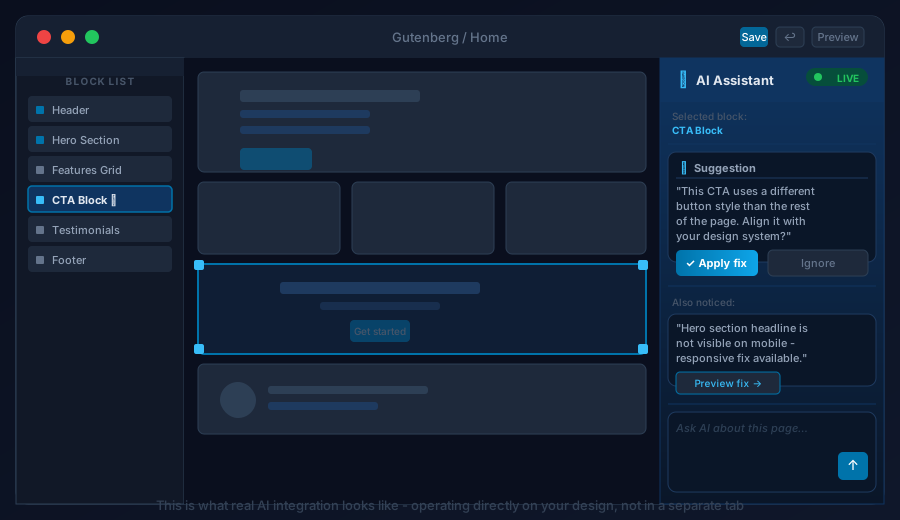
Инструментите, най-добре позиционирани да доставят това, са конструкторите на страници и визуалните редактори. Те вече притежават пълната картина: токените на дизайна, библиотеката с компоненти, структурата на оформлението, съдържанието. Знаят точно как изглежда страницата, как е изградена и какви ограничения трябва да спазват промените.
Конструктор на страници с истинска AI интеграция би могъл да прави неща, реално спестяващи часове:
- Структурни предложения с контекст. Не „ето секция герой”, а „ето секция герой, изградена от съществуващите ви компоненти, използваща цветовете на бранда ви, вписваща се в мрежата, използвана на всяка друга страница.”
- Разрешаване на проблеми с адаптивността. „Това оформление се счупва на таблет — ето версия, запазваща същата визуална йерархия при поправяне на проблема с препълването.”
- Прилагане на дизайн консистентност. „Стилът на този бутон не съответства на останалите на страницата — искате ли да го обновите или да го запазите различен?”
- Автоматизирано генериране на варианти. Изградете A/B тест версия на секция, променяща оформлението, а не само текста, и ви позволяваща да сравните и двете в редактора.
Нищо от това не е научна фантастика. Техническата способност съществува. Липсващото е интеграционната работа — изграждане на AI, работещ на дизайн слоя, а не само на слоя на съдържанието.
Защо никой не го е направил все още
Изграждането на AI, разбиращ и модифициращ структурата на страниците, е значително по-трудно от изграждането на AI, генериращ текст. Генерирането на текст е добре разбран проблем със зрели модели и API-та. Генерирането на дизайн е по-объркано. Страниците имат състояние, ограничения, йерархии на компоненти, responsive breakpoints и правила за бранда. Получаването на AI, работещ надеждно в рамките на всички тези ограничения, изисква дълбока интеграция с базовия редактор, а не функция, добавена върху него.
Изисква и продуктовите екипи в компаниите за конструктори на страници да решат, че това си струва приоритизиране. Това означава да се надхвърли AI като маркетингов диференциатор и AI като основна част от редакторското изживяване. Някои започват да се движат в тази посока, но повечето все още са на етапа на доставяне на бутона за AI писане и наричане на това иновация.
Какво да очаквате през следващите години
Настоящата вълна от AI функции в уеб инструментите ще се консолидира. Gadget-ите ще изчезнат. Това, което ще оцелее и накрая ще узрее, е AI, заслужаващ мястото си в работния поток чрез реална полезност на дизайн слоя — не просто генериране на съдържание, но помагане за оформяне, структуриране и прецизиране на реалното визуално и функционално изживяване.
Вече виждаме ранни експерименти. Някои конструктори на страници започват да излагат дизайн системата си на AI модели. Няколко инструмента позволяват на AI да модифицира конфигурацията на компоненти, а не само текстово съдържание. Архитектурата започва да се появява.
Когато това узрее, печалбите в производителността ще бъдат реални. Начинаещ дизайнер, използващ AI-нативен конструктор на страници, ще може да произвежда работа, изискваща в момента опита на старши дизайнер. Малък маркетингов екип ще може да итерира върху целеви страници за часове вместо дни. Обновяванията на съдържанието, изисквали преди участие на разработчик, ще се случват за минути.
Това е AI интеграцията, заслужаваща чакане. Настоящият AI бутон в страничната лента на CMS-а ви — не е тя.
Какво да направите сега
Докато наистина полезното не пристигне, препоръката ни е проста: бъдете селективни.
Не избягвайте изцяло AI инструментите, но не реорганизирайте работния си поток около функции, неспестяващи ви значимо време. Използвайте AI за нещата, в които вече е добър — изготвяне на първи версии на текст, мозъчна атака, обобщаване, генериране на груби концепции за реакция спрямо тях. Те са ценни в правилния контекст.
Но не позволявайте на AI бутона да ви кара да се чувствате, че инструментите ви са по-модерни, отколкото са. По-голямата част от маркетингираното днес като AI интеграция е шум. Сигналът идва — просто не е тук все още.
Следим отблизо накъде се насочват конструкторите на страници и визуалните редактори с техните AI пътни карти. Когато нещо бъде пуснато, реално променящо начина ни на работа, ще напишем за това. Ако искате да обсъдим как AI инструментите се вписват в текущия ви работен поток, свържете се с нас.